In two sentences
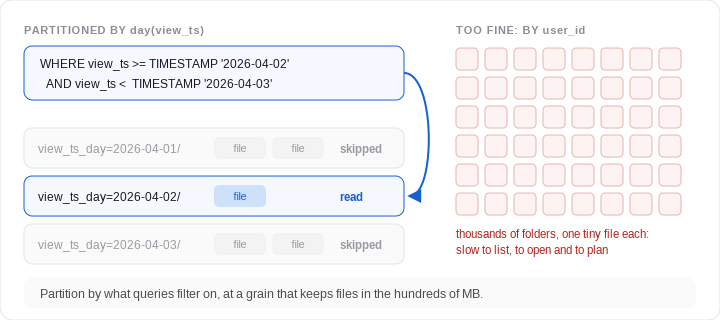
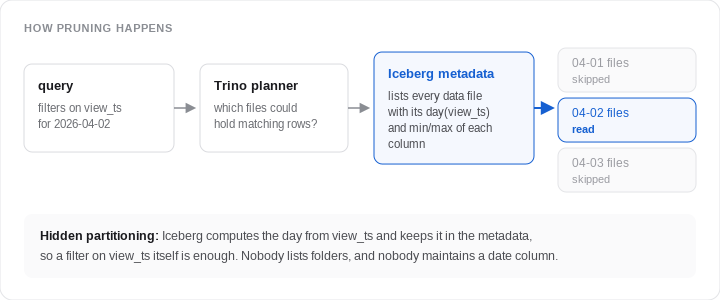
Partitioning stores a table in separate folders by the value of a column, such as one folder per day. A query that filters on that column only opens the folders it needs; skipping the rest is called pruning, and it's the difference between reading 1 GB and 1 TB.
See it
s3://lake/page_views/
  view_date=2026-04-01/  part-0.parquet  part-1.parquet
  view_date=2026-04-02/  part-0.parquet
view_date=2026-04-03/ part-0.parquet part-1.parquet| query | folders read |
|---|---|
WHERE view_date = DATE '2026-04-02' | 1 |
WHERE view_date >= DATE '2026-04-02' | 2 |
WHERE country = 'FR' | all 3 (not the partition column) |
In SQL
Iceberg in Trino, partitioned by the day of a timestamp:
CREATE TABLE page_views (
  view_ts timestamp(6), user_id varchar, url varchar, country varchar
)
WITH (partitioning = ARRAY['day(view_ts)']);
This is Iceberg's hidden partitioning: you filter on view_ts itself and Iceberg prunes by day for you. No
separate view_date column to keep in sync.
SELECT count(*) FROM page_views
WHERE view_ts >= TIMESTAMP '2026-04-02 00:00' AND view_ts < TIMESTAMP '2026-04-03 00:00';
See what's actually on disk:
SELECT * FROM "page_views$partitions";   -- one row per partition: record and file counts
SELECT file_path, record_count, file_size_in_bytes FROM "page_views$files";
Choosing the column
Partition by what queries filter on most, at a grain that keeps each partition reasonably large.
| choice | result |
|---|---|
day(view_ts) for dashboards filtered by date | ✓ |
user_id (millions of values) | millions of tiny files: slow to list and to read |
hour(view_ts) for 10 MB a day | thousands of tiny partitions; use day or month |
| a high-cardinality key you must filter on | bucket(16, user_id): a fixed number of groups |
When to use it
Partition when both are true: the table is large (tens of GB and growing), and most queries filter on one column, usually time. If either is false, don't.
| situation | approach |
|---|---|
| events, logs, facts queried by date range | day(ts) (or month(ts) when a day is small) |
| also filtered by country, customer, status… | partition by time, sort by the second column (sorted_by) |
| filtered by a high-cardinality key (user, device) | bucket(n, key), not the raw key |
| a dimension or a table under a few GB | no partitioning |
| queries changed and the layout no longer fits | Iceberg partition evolution: new data uses the new spec, no rewrite |
Best practices
- Design from the queries, not the data. List the five most common filters before choosing.
- Aim for files in the hundreds of MB. Thousands of KB-sized files are slower than one unpartitioned table.
- Compact on a schedule when something writes often (streaming, frequent MERGE): in Trino,
ALTER TABLE page_views EXECUTE optimize. - Prefer Iceberg's hidden partitioning to a hand-maintained
event_datecolumn; filters on the real column prune, and nobody can write a mismatched value. - Check that it prunes. Compare the data read in the query stats with and without the filter.
Common mistakes
- Filtering on a function of a Hive-style partition column. With a
view_datecolumn,WHERE year(view_date) = 2026may not prune. Filter on the column directly, with a range. - Too fine a grain. Small files are the most common lakehouse performance problem. Each file has overhead on listing, opening and planning.
- Losing the layout on export. Writing the result of a query without the partitioning drops it; the next reader scans everything.
- Partitioning a small table. Below a few GB, one well-sorted set of files is usually faster.
What an interviewer asks next
- "Queries filter by date and by country. How do you lay it out?" Partition by date; sort or cluster by country inside the partitions.
- "A streaming job writes a file every minute. What happens after a month?" Small files. Compact them on a schedule.
Go further
Iceberg's partitioning page explains hidden partitioning and why it removes a whole class of mistakes. Trino's
Iceberg page lists the transforms (year, month, day, hour, bucket, truncate) and the metadata tables.
Practise it
Lay Out Page Views by Day in S3, then Compact a Micro-Batched Table Full of Small Files, then Choose a Partition Spec for How the Table Is Actually Queried.